Blog
Samsung WA65F Interactive Panel Review 2026 | Price, Specs & Verdict | ProAudio Video

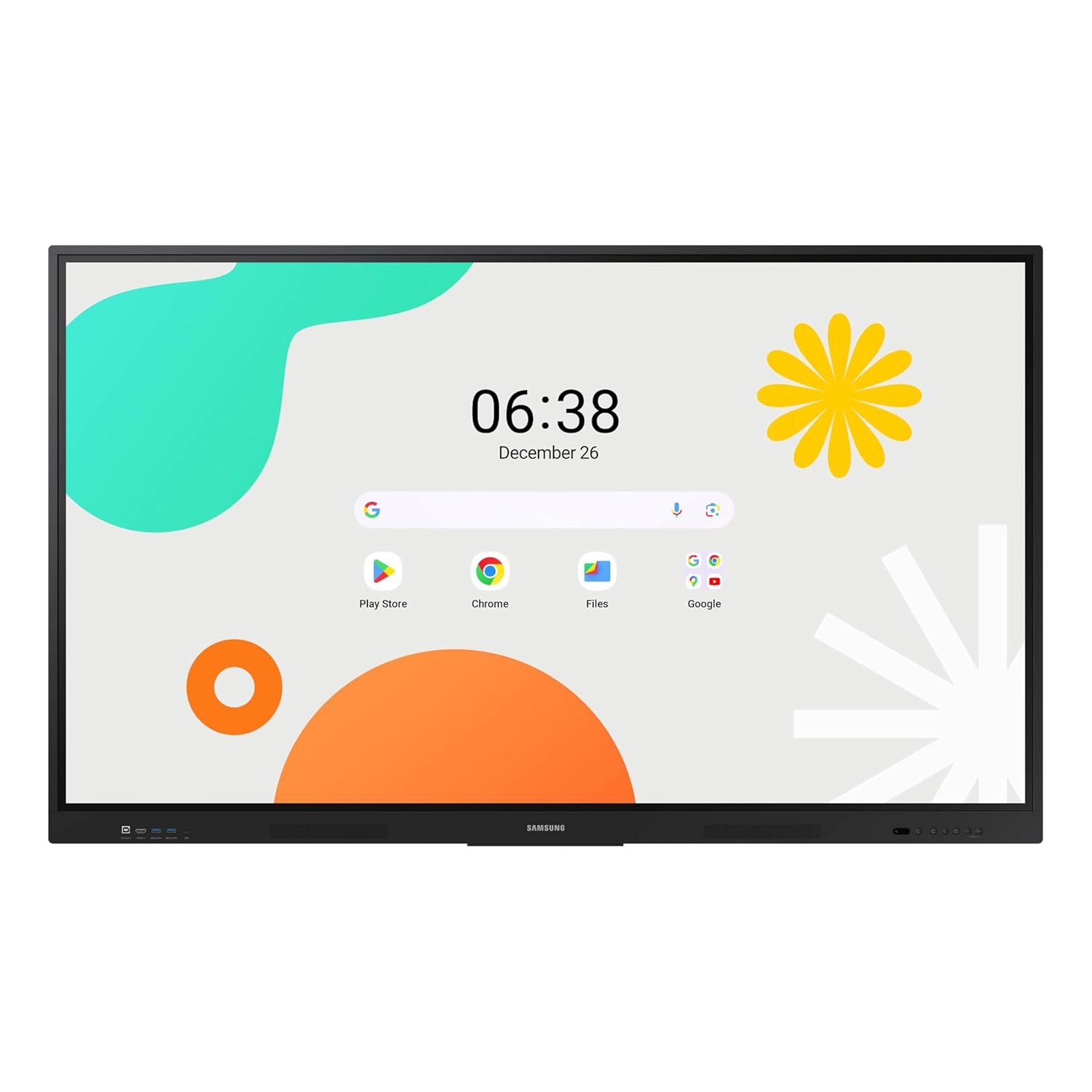
Samsung WA65F Interactive Panel
A 65-inch 4K Android 14 interactive flat panel with 40-point IR touch and Google EDLA certification — the most sensible smart board buy in India under ₹1 lakh.
The Samsung WA65F Interactive Panel is a 65-inch 4K UHD interactive flat panel display built for classrooms, coaching institutes, training rooms and corporate meeting spaces, and at ₹81,000 in India it is one of the few Google EDLA-certified smart boards that sits comfortably under the ₹1 lakh mark. It replaces the projector, the whiteboard, the screen and the wireless presentation dongle with a single wall-mounted panel that boots into Android 14, runs Google Classroom and the Play Store natively, and accepts up to 40 simultaneous touch points. For a product that carries a ₹1,50,000 list price, the current ₹81,000 street price at ProAudio Video makes the WA65F a genuinely aggressive proposition in the Indian interactive display market.
This panel is aimed squarely at anyone who has been quoted ₹2 lakh or more for an interactive flat panel and walked away. Schools fitting out multiple classrooms, coaching centres in Delhi, Kota and Hyderabad running back-to-back batches, corporate training rooms that need wireless casting from a dozen laptops, and small conference rooms that want a Teams or Zoom screen without a separate PC are the natural buyers. If your requirement is “one screen, everything built in, no external media player, no projector bulb to replace”, the Samsung WA65F Interactive Panel answers it directly — and it does so with Samsung’s commercial display warranty and service network behind it in India.
⚡ Quick Specifications at a Glance
✅ Pros
- Google EDLA certified — full Play Store, Google Classroom, Drive and YouTube run natively, no side-loading
- 40-point infrared multi-touch lets a whole group write on the board at once
- 3-in-1 USB-C port carries video, touch-back and 65W laptop charging over a single cable
- 8GB RAM with 64GB storage and an octa-core SoC — no external OPS PC needed for everyday teaching
- Excellent value: ₹81,000 against a ₹1,50,000 list price, and well below most 65-inch rivals in India
❌ Cons
- 400 nits brightness is adequate but not class-leading — very bright, sun-facing rooms need blinds
- Boot time is slow compared with a projector or a plain display; users report a long cold start
- The matte anti-glare glass shows fingerprints readily and needs regular wiping
Picture Quality and Touch Performance
The WA65F uses a 65-inch Direct LED-backlit LCD panel at a native 3840 × 2160 resolution, which works out to roughly 68 pixels per inch — sharp enough that a student in the back row of a 30-seat classroom reads 20-point text without squinting, and sharp enough that engineering drawings or spreadsheets stay legible when four windows are tiled on screen. Brightness is rated at 400 cd/m², which is the standard figure for education-grade interactive panels and is comfortably brighter than any projector at this price. In a normally lit classroom with tube lights on it looks punchy; in a room with an uncovered west-facing window at 4pm you will want blinds. The 178-degree viewing angle means the image does not wash out for students seated at the extreme sides of the room, which is where cheaper VA-panel boards typically fall apart.
Touch is handled by an infrared array supporting up to 40 simultaneous touch points, with the panel distinguishing pen, finger and palm. In practice that means one student can write with the bundled stylus while another erases with a palm and a third drags an image — all at the same time. Samsung quotes a dual-pen function with a double-sided nib so you can switch ink colour by flipping the pen rather than tapping a menu, which is a small thing that saves a lot of teaching time. Latency is low enough that handwriting feels natural rather than laggy, though IR touch will never feel quite as precise as a capacitive tablet at the very edges of the bezel.
Build Quality and Design
This is a commercial-grade fixture, not a consumer TV, and it is built accordingly. The chassis measures 1482.1 × 891.4 × 87.7 mm and weighs about 36.25 kg, so plan on two people and a proper wall bracket or trolley for installation. It uses a standard 600 × 400 mm VESA pattern, which means it drops onto almost any commercial interactive-panel wall mount or mobile stand sold in India without adapters. The front glass carries a shatterproof film and an anti-microbial coating — both meaningful in a school where dozens of hands touch the surface every day and where an accidental knock from a desk corner is a real risk.
The panel is rated for 12 hours of operation per day, which is the correct spec for a school running from 8am to 4pm plus evening tuition batches; it is not a 24/7 signage panel and should not be specified as one. Physical controls and the main port cluster are positioned for wall-mounted access, and an OPS slot on the rear takes a standard Open Pluggable Standard PC module if you later decide you need full Windows on the board. The one ergonomic complaint that comes up repeatedly from real users is fingerprints: the matte anti-glare finish resists reflections well but holds oil from fingertips, so a microfibre cloth becomes part of the classroom kit.
Features, Software and Connectivity
The headline feature is Android 14 with Google EDLA certification. EDLA (Enterprise Devices Licensing Agreement) is what separates a legitimate Google-licensed board from the grey-market Android panels that flood the Indian market — it means the Play Store, Google Classroom, Google Drive, YouTube and Meet are installed and updated officially, with Google’s security patches, rather than side-loaded APKs that break at the next update. For any school in India already running Google Workspace for Education, this alone justifies choosing the WA65F over a cheaper uncertified board. Behind the OS sits an octa-core processor with 8GB of RAM and 64GB of internal storage, which is enough headroom to keep a browser, a PDF, the whiteboard app and a casting session open simultaneously.
Connectivity is generous. You get three HDMI 2.0 inputs with CEC, an HDMI output for daisy-chaining or recording, a 3-in-1 USB-C port that carries video in, touch-back to a connected laptop and up to 65W of charging over one cable, five USB ports across USB 2.0 and USB 3.0, an RJ45 LAN port, a 3.5 mm headphone output, plus built-in Wi-Fi and Bluetooth. Audio comes from a 2 × 15W stereo speaker pair, which is loud and clear enough for a standard classroom but will want an external soundbar in a large hall. On the software side, Samsung’s AirClass tool lets students join and contribute from their own devices, wireless screen mirroring works from Android, iOS, Windows and Mac, and the upgraded Note app allows four independent note zones on one page so four people can work without overwriting each other.
Value for Money in India 2026
Interactive flat panels in India have been stubbornly expensive, with 65-inch models typically quoted between ₹1,20,000 and ₹3,00,000 depending on brand and channel. Against that backdrop, ₹81,000 for a Samsung-branded, Google EDLA-certified, 8GB/64GB Android 14 panel is a genuinely disruptive number — it is roughly 46% off the ₹1,50,000 list price. Put differently: for the cost of one BenQ or ViewSonic 65-inch board you could fit out two classrooms with the WA65F. Factor in that there is no projector lamp to replace every 3,000 hours, no separate screen, no ceiling mount and no external mini-PC, and the total cost of ownership over five years lands well below a projector-plus-whiteboard setup. For Indian schools, coaching chains and SMEs working to a fixed per-classroom budget, that maths is hard to argue with at ₹81,000.
Full Technical Specifications
| Specification | Details |
|---|---|
| Brand | Samsung |
| Model | WA65F (WAF Series Interactive Display) |
| Type | 65-inch 4K UHD interactive flat panel / smart board |
| Panel & Resolution | Direct LED-backlit LCD, 3840 × 2160 (4K UHD) |
| Brightness / Viewing Angle | 400 cd/m² / 178° |
| Touch Technology | Infrared, up to 40 simultaneous touch points, dual pen + palm erase |
| Operating System | Android 14, Google EDLA certified (Play Store, Classroom, YouTube) |
| Processor / Memory | Octa-core SoC, 8GB RAM, 64GB internal storage |
| Audio Output | 2 × 15W built-in stereo speakers, 3.5 mm headphone out |
| Connectivity | 3× HDMI 2.0 (CEC) in, HDMI out, USB-C 3-in-1 (65W PD), 5× USB (2.0/3.0), RJ45 LAN, Wi-Fi, Bluetooth, OPS slot |
| Rated Operating Hours | 12 hours per day |
| Weight | Approx. 36.25 kg |
| Dimensions | 1482.1 × 891.4 × 87.7 mm |
| Mounting | VESA 600 × 400 mm |
| Colour Options | Black |
| Warranty | 1 Year Manufacturer Warranty |
| Price in India | ₹81,000 — Buy at ProAudio Video |
⚖️ How the Samsung WA65F Compares
BenQ RM6504
Approx. ₹1,25,000+
Brighter 450-nit IPS panel and 3-year warranty, but Android 13 and a much higher price per classroom.
ViewSonic ViewBoard IFP6552
Approx. ₹1,20,000
Stronger 45W soundbar and built-in mic array, but older platform and no EDLA-grade Android 14.
Who Should Buy the Samsung WA65F Interactive Panel?
✅ Buy it if you: run a school, coaching institute or training centre in India that needs to fit multiple rooms on a fixed budget and cannot justify ₹2 lakh per screen; already use Google Workspace for Education and want Classroom, Drive and Meet running natively on a licensed EDLA board; want to retire a projector, screen and whiteboard and replace all three with one wall-mounted panel; or need a meeting-room display where visitors can cast wirelessly and charge a laptop off the same USB-C cable they present through.
❌ Skip it if you: need a panel for a very bright atrium, lobby or sun-flooded hall where 400 nits will look washed out and a 700-nit signage display is the right tool; require Windows-native applications such as Excel with VBA macros to run directly on the board without adding an OPS PC module; or are specifying a display for continuous 24/7 digital signage duty, which falls outside this panel’s 12-hour daily rating.
Frequently Asked Questions About the Samsung WA65F Interactive Panel
What is the price of Samsung WA65F in India?
The Samsung WA65F is priced at ₹81,000 in India. You can buy it from ProAudio Video, one of India’s leading pro audio and video retailers, with fast delivery across India including Mumbai, Delhi, Bangalore, Hyderabad, Chennai, Kolkata and more.
Is the Samsung WA65F good for classroom teaching?
Yes. It is purpose-built for education: 40-point infrared touch lets several students write at once, the Note app supports four independent writing zones on a single page, and Google EDLA certification means Google Classroom, Drive and YouTube run natively. The 4K panel stays legible from the back of a standard 30-seat classroom, and 2 × 15W speakers cover normal room audio without an add-on soundbar.
What is the warranty on Samsung WA65F in India?
The Samsung WA65F comes with a standard 1-year manufacturer warranty in India. ProAudio Video provides after-sales support and can assist with warranty claims. Always check current warranty terms at purchase as these can change.
What are the best alternatives to Samsung WA65F in India?
Top alternatives in the ₹80,000–₹1,30,000 range include the BenQ RM6504 (approx. ₹1,25,000 — brighter 450-nit IPS panel and longer warranty, but Android 13 and a far higher cost per classroom) and the ViewSonic ViewBoard IFP6552 (approx. ₹1,20,000 — stronger 45W audio and a built-in mic array, but an older platform). You can browse all interactive display options at ProAudio Video.
Does ProAudio Video ship the Samsung WA65F across India?
Yes, ProAudio Video ships the Samsung WA65F to all major cities across India including Mumbai, Delhi, Bangalore, Pune, Hyderabad, Chennai, Ahmedabad, Kolkata and more. Order here for the best price and fast delivery.
Do I need a separate PC or OPS module with the Samsung WA65F?
No, not for everyday use. The panel runs Android 14 on an octa-core processor with 8GB RAM and 64GB storage, so browsing, whiteboarding, Google Classroom, PDFs and presentations all run on board. You only need the optional OPS slot PC if you require Windows-specific software — for example Excel files with VBA macros, or legacy lab applications that have no Android equivalent.
🏆 ProAudio Video Verdict
The Samsung WA65F Interactive Panel is the value pick of the 65-inch interactive display market in India right now. Google EDLA certification, 40-point touch, 8GB/64GB Android 14 and a 3-in-1 USB-C port are flagship-tier features at a price that undercuts most rivals by a third or more. Slow boot times and 400-nit brightness are the honest compromises — everything else punches well above ₹81,000.